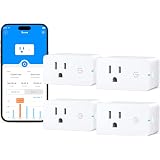
The contemporary residence is increasingly defined by its integration of advanced technology, yet many functional household appliances often lack inherent smart capabilities. This situation frequently presents a challenge for individuals seeking to modernize their living spaces without incurring the expense of replacing fully operational, albeit “dumb,” devices. Fortunately, a sophisticated and economically viable solution exists in the form of smart plugs, which effectively bridge this technological divide.
As adeptly demonstrated in the accompanying video, smart plugs serve as a foundational component in the establishment of a robust home automation ecosystem. These compact, internet-enabled devices are engineered to transform standard electrical outlets into intelligent control points, thereby granting users unprecedented command over a wide array of conventional electronics. The strategic deployment of smart plugs facilitates enhanced convenience, improved energy management, and augmented security protocols, all within an accessible technological framework.
The Operational Principles of Smart Plugs
At its core, a smart plug operates as an intermediary switch, positioned between a traditional wall outlet and an electronic appliance. Its primary function involves the remote control of power flow to the connected device, enabling instantaneous activation or deactivation via a dedicated mobile application or integrated voice assistant. Functionality is typically predicated upon a secure Wi-Fi connection, ensuring seamless communication within the home network and extending control capabilities globally through cloud services.
Furthermore, contemporary smart plugs are often equipped with an array of advanced features designed to optimize device management and user experience. These capabilities may include granular scheduling, which allows for precise timing of power cycles, and robust energy monitoring, providing critical insights into consumption patterns. The integration with prominent voice control platforms, such as Amazon Alexa and Google Assistant, further enhances accessibility, permitting hands-free operation and contributing to a truly intuitive smart home environment.
Strategic Selection and Technical Specifications of Smart Plugs
The market for smart plugs is characterized by its diversity, offering specialized solutions tailored to various operational requirements. Considerations for selection frequently encompass factors such as energy monitoring capabilities, the inclusion of multiple outlets or USB ports, and specific environmental ratings for outdoor deployment. Interoperability with existing smart home ecosystems is also a critical determinant, ensuring cohesive operation with preferred voice assistants and automation platforms.
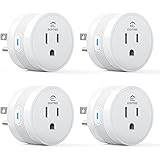
A notable exemplar in this category, as highlighted in the video, is the TP-Link Kasa Smart Wi-Fi Plug Mini. This particular model is recognized for its robust feature set, which includes advanced scheduling functionalities, seamless compatibility with Amazon Alexa and Google Assistant, and remote access for devices consuming up to 1500 watts. Such a power rating ensures its suitability for a broad spectrum of small appliances, ranging from desk fans and coffee makers to various lighting fixtures. Moreover, its compact form factor is strategically designed to prevent obstruction of adjacent electrical outlets, optimizing the utilization of power strips and wall receptacles.
Establishing Connectivity: The Kasa Smart Plug Implementation Process
The deployment of a Kasa Smart Plug is characterized by its straightforward procedural steps, designed for efficient integration into the home network. Initial setup necessitates the installation of the proprietary Kasa application on a mobile device and the creation of a user account. Subsequently, the physical plug is inserted into a standard electrical outlet, initiating a distinctive blinking pattern of orange and blue LED lights, which signifies its entry into a pairing mode.
The pairing process is then completed within the Kasa application, where specific instructions guide the user through the establishment of a secure Wi-Fi connection. It is imperative to note that the Kasa plug, along with many other IoT devices, primarily operates on the 2.4 GHz band of a Wi-Fi network. This requirement is due to the 2.4 GHz frequency offering a greater range and better penetration through obstacles compared to the 5 GHz band, despite the latter’s higher data transfer rates. Therefore, ensuring the host router is correctly configured and the device is connected to the appropriate band is a crucial step for maintaining stable connectivity. Upon successful network integration, the device is assigned a user-defined name and an optional custom icon, thereby completing the setup and preparing the smart plug for operational use.
Advanced Automation Protocols and Device Orchestration
Beyond rudimentary on/off controls, smart plugs facilitate sophisticated automation protocols that significantly enhance their utility within a connected home environment. The timer function, for instance, permits the precise definition of countdown sequences, enabling automatic device activation or deactivation after a specified duration. This capability is particularly advantageous for managing temporary appliance usage, such as running a fan for a predetermined period.
Scheduling functionalities represent a more comprehensive approach to device automation, allowing for the establishment of recurring power cycles based on specific times and days of the week. This enables the pre-programming of tasks, such as initiating coffee preparation on weekday mornings prior to awakening, a process that, while requiring antecedent preparation, contributes significantly to daily convenience. Furthermore, the Kasa ecosystem extends scheduling to encompass astronomical events, permitting devices to be automatically activated or deactivated in accordance with local sunrise and sunset times, thereby optimizing lighting control and contributing to an immersive smart home experience.
Orchestrating Multiple Devices: Scenes and Security Simulations
For residences equipped with multiple smart plugs, the Kasa application introduces the concept of “scenes,” which are predefined configurations designed to activate a collection of devices simultaneously or sequentially. These scenes, which may be initiated manually or via a schedule, facilitate the rapid transformation of a living space to suit various activities, such as “Good Morning,” “Good Night,” or “Movie Night.” The ability to create custom scenes provides unparalleled flexibility, allowing users to tailor their smart home environment to exact preferences and daily routines.
Moreover, the integration of an “Away Mode” significantly enhances home security protocols. This feature systematically randomizes the activation and deactivation of connected devices, such as lamps or televisions, during specified periods. The simulation of occupancy effectively deters potential intruders, thereby augmenting the protective measures implemented within the residence. This intelligent randomization, coupled with remote monitoring capabilities, provides a robust layer of security, offering peace of mind to homeowners when away from their property.
Remote Accessibility and Voice-Activated Command Structures
A cornerstone of smart plug functionality is its inherent remote accessibility, which permits full operational control of connected devices from virtually any location with an active internet connection. This capability ensures that device status can be monitored and adjusted irrespective of the user’s physical proximity to the home, offering unparalleled flexibility and responsiveness in managing household electronics.
The integration of smart plugs with prominent voice assistant platforms further elevates the user experience by enabling intuitive, hands-free control. Once a Kasa account is securely linked within the Google Home or Alexa applications, devices can be commanded through simple verbal instructions. This voice-activated command structure facilitates seamless interaction with the smart home ecosystem, allowing for immediate power adjustments or scene activations without requiring physical interaction with a mobile device. This convergence of remote access and voice control underscores the comprehensive utility of smart plugs in modern home automation, providing a sophisticated yet user-friendly interface for device management.
Smart Plug Q&A: Let’s Connect Your Questions
What is a smart plug?
A smart plug is a small device that plugs into a standard electrical outlet, allowing you to remotely control the power to any device plugged into it. It effectively turns ‘dumb’ devices, like lamps or fans, into smart devices.
What are some things I can do with a smart plug?
You can remotely turn devices on or off, set schedules for automatic power cycles, or use a countdown timer. Some smart plugs also offer features like energy monitoring and an ‘Away Mode’ for security.
How do smart plugs connect to my home?
Smart plugs typically connect to your home’s Wi-Fi network. Most often, they operate on the 2.4 GHz Wi-Fi band for better range and penetration through obstacles.
What is the first step to setting up a smart plug?
The initial step involves installing the smart plug’s dedicated mobile application and creating a user account. Afterward, you physically plug the smart plug into a standard electrical outlet to begin the pairing process.
Can I control my smart plug using my voice?
Yes, most contemporary smart plugs are compatible with popular voice assistants such as Amazon Alexa and Google Assistant. Once linked, you can control your connected devices with simple verbal commands.