With an estimated 46% of U.S. households owning at least one smart home device, the quest for seamless integration and optimal functionality continues to drive consumer choices. Smart plugs, in particular, represent an accessible and cost-effective entry point into home automation. They transform ordinary appliances into intelligent devices, allowing for remote control, scheduling, and even energy monitoring. The accompanying video offers a direct comparison of several HomeKit smart plugs, highlighting both those to consider and those to potentially avoid. This comprehensive guide builds upon that foundation, delving deeper into the nuances of selecting the best HomeKit smart plugs for your unique smart home ecosystem.
Understanding the critical role of a HomeKit hub, such as an Apple TV or HomePod Mini, is paramount for unlocking the full potential of any HomeKit smart plug. These hubs enable remote access and sophisticated automations, moving beyond simple on/off commands to create a truly responsive living space. While the video covers a selection of models, we will explore the underlying technologies and practical implications in greater detail, helping you make an informed decision for your smart home setup.
Evaluating HomeKit Smart Plugs: The Ones to Approach with Caution
Choosing the right smart plug for your HomeKit system involves more than just compatibility; it requires a deep dive into features, reliability, and overall value. The video above identifies a couple of models that, despite their potential, might not deliver the optimal experience. We’ll unpack why these particular options may fall short for many users seeking a robust HomeKit integration.
Belkin WeMo Smart Plug with Thread: A Closer Look at Expectations vs. Reality
The Belkin WeMo smart plug, with its inclusion of Thread technology, initially appears to be a forward-thinking choice. Thread is designed to create a more resilient and responsive smart home network, promising faster communication and enhanced reliability compared to traditional Wi-Fi or Bluetooth connections. The setup experience, utilizing NFC, is commendably straightforward and the exclusive HomeKit support means no reliance on third-party apps for settings or updates.
However, the execution of Thread in this particular model raises some questions. The speaker noted that the plug functions as a Thread router, not a border router. This distinction is crucial; without a dedicated Thread border router (like a HomePod Mini or a newer Apple TV), the device will default to a less reliable Bluetooth connection. Even when connected via Thread, the plug’s responsiveness did not demonstrate a noticeable improvement over non-Thread devices like Meross or TP-Link in the video’s assessment. While the speaker reported stable connectivity over a week of testing, many users have reported connection issues, highlighting a potential inconsistency in performance that could be frustrating for those expecting Thread’s promised benefits. Furthermore, the absence of energy monitoring and an uncontrollable indicator light are minor inconveniences that, when combined with the Thread performance issues, diminish its overall appeal for a premium smart plug.
Leviton HomeKit Smart Plug: Features vs. Alternatives
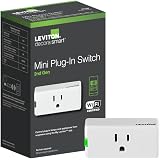
Leviton, a well-established name in electrical switches, has made its foray into the HomeKit smart plug market. This device boasts broad compatibility with various smart home assistants without requiring a dedicated hub, offering a degree of flexibility. Despite its solid performance in the Home app, characterized by quick responses and stable connections, its feature set leaves something to be desired when compared to its competitors.
A significant drawback is the lack of energy monitoring, a feature increasingly sought after by users keen on understanding their power consumption. Imagine if you wanted to track which appliances were contributing most to your electricity bill; this plug wouldn’t provide that vital data. Its physical size is also noteworthy; being larger than many alternatives, it has the potential to obstruct adjacent outlets, which can be a practical limitation in power strips or wall outlets. While it does offer a physical button that doubles as an LED indicator (which can be toggled off via the Leviton app), this doesn’t fully compensate for the missing features. Ultimately, for a comparable price, numerous other HomeKit smart plugs offer a richer set of functionalities, making the Leviton option less compelling for maximizing value.
Top HomeKit Smart Plugs to Enhance Your Smart Home
Now, let’s pivot to the smart plugs that genuinely elevate your HomeKit experience, offering a blend of performance, features, and value. The video above highlights several commendable options, and we will explore why these choices stand out, providing a more in-depth look at their capabilities and how they can seamlessly integrate into your smart home.
TP-Link Kasa Smart Plug (KP125): The Budget-Friendly Powerhouse
TP-Link has long been a recognized brand in networking, and their entry into the HomeKit smart plug arena with the KP125 has been met with enthusiasm. This plug quickly became a favorite for many, largely due to its impressive feature set and accessible price point. A standout benefit is its compact design, which allows multiple plugs to be stacked without obstructing neighboring outlets—a common frustration with bulkier devices.
Crucially, the TP-Link Kasa smart plug includes energy monitoring, a feature often reserved for more expensive models. All energy data is neatly presented within the Kasa app, allowing users to track consumption. While it lacks the graphical display found in some competitors, the raw data provides invaluable insights into appliance usage. Imagine being able to see exactly how much power your space heater consumes daily; this data can inform energy-saving habits. The plug also operates without a dedicated hub, simplifying setup, and its performance in the Home app is consistently fast and reliable. Given its robust feature set and competitive pricing, especially when purchased in multi-packs, the TP-Link KP125 stands as an excellent choice for anyone prioritizing energy monitoring and affordability in their HomeKit smart plugs.
SwitchBot Smart Plug Mini: Innovative Features and Energy Insights
SwitchBot, known for its innovative approach to smart home devices, has introduced a smart plug that seamlessly integrates with HomeKit, offering another strong contender for energy monitoring enthusiasts. Similar to the TP-Link and Eve Energy plugs, it provides detailed energy consumption data, complete with a graph in the SwitchBot app that visualizes usage over time. This graphical representation can be incredibly useful for spotting trends and identifying power-hungry devices at a glance.
Beyond energy monitoring, the SwitchBot smart plug introduces an intriguing NFC control feature. Theoretically, users can tap an NFC tag to toggle the plug’s power or switch it on/off. While the speaker encountered some technical glitches with “Tag memory insufficient” errors during their testing, the concept itself opens up interesting automation possibilities. Imagine having an NFC tag by your door that, when tapped, simultaneously turns off your bedside lamp via the smart plug and locks your smart door. Even without direct NFC control from the plug itself, using Siri Shortcuts with NFC tags can still achieve similar results for any HomeKit device. Despite the NFC hiccup, the plug delivers reliable and fast performance within the Apple Home app, making it a solid option for those who value detailed energy insights and are intrigued by alternative control methods for their HomeKit smart plugs.
Aqara Smart Plug: Zigbee Reliability and Ecosystem Benefits
The Aqara Smart Plug sits at the higher end of the price spectrum for HomeKit smart plugs, but it justifies its cost with a unique set of features, most notably its reliance on Zigbee wireless technology. Zigbee is renowned for its low power consumption, high reliability, and exceptionally fast response times, often outperforming even Thread-enabled devices. However, this superior performance comes with a key requirement: an Aqara hub is necessary for the plug to function within HomeKit and other smart home platforms. This additional expense might be a barrier for those not already invested in the Aqara ecosystem.
The benefits of Aqara’s Zigbee integration extend beyond individual device performance. The smart plug also acts as a Zigbee repeater, effectively extending the mesh network and bolstering the connection stability for all other Aqara devices in your home. Imagine if you have Aqara sensors spread across a large house; this plug helps ensure every device maintains a robust connection. Moreover, Aqara offers comprehensive energy monitoring, providing more granular data, such as daily power usage summaries and a list view of consumption. Despite its relatively large size, which can obstruct adjacent outlets, and an unturnable blue indicator light, the Aqara smart plug is an excellent choice for users who are already part of the Aqara ecosystem or who prioritize the robust, low-latency performance of Zigbee for their HomeKit smart plugs and associated automations.
Meross Smart Plug: Unmatched Reliability and Unique Timer Features
Meross has cultivated a strong reputation among HomeKit users for its consistent performance, budget-friendly pricing, and thoughtful features. It has become a long-time favorite for many, offering an accessible way to expand smart home capabilities throughout a residence. The space-saving design is a significant advantage, ensuring that multiple Meross plugs can be used side-by-side without interference, a practical consideration for power strips and dual outlets.
A standout feature that sets Meross apart is its advanced timer functionality, especially the ability to create scenes that automatically power off a device after a set duration. Imagine setting up a night light for your pet that turns on when you go to bed and automatically shuts off 30 minutes later, without needing to manually intervene or rely on fixed schedules. While other brands like TP-Link and SwitchBot offer similar timer capabilities, Meross uniquely displays a live countdown directly on its app’s home screen. This visual feedback is incredibly convenient, particularly if you manage multiple timed devices simultaneously. Meross operates on Wi-Fi, eliminating the need for a dedicated hub, and boasts remarkably fast response times within the Apple Home app. Although it lacks energy monitoring, its overall reliability—with connection issues being rare and easily resolved—and user-friendly design make it an exceptional value. For those seeking dependable, feature-rich HomeKit smart plugs without the need for energy consumption data, Meross remains a top recommendation.
Making the Smart Choice: Key Considerations for HomeKit Smart Plugs
When navigating the diverse landscape of HomeKit smart plugs, several factors should guide your decision-making process. These considerations, often highlighted by the strengths and weaknesses of the reviewed products, are crucial for ensuring your smart plug investment genuinely enhances your smart home experience.
Connectivity Standards: Wi-Fi, Thread, and Zigbee
The underlying connectivity technology significantly impacts a smart plug’s performance and reliability. Wi-Fi smart plugs, like those from Meross and TP-Link, are generally easy to set up as they connect directly to your home network, often without needing an additional hub. However, they can sometimes add traffic to your Wi-Fi, and stability can vary based on network strength.
Thread, seen in the Belkin WeMo, is a newer mesh networking standard designed for improved reliability and speed. While promising, its effectiveness hinges on having a Thread border router within your HomeKit setup. Without it, Thread devices often revert to less efficient Bluetooth connections. Zigbee, utilized by Aqara, is another mesh network standard known for its robustness, speed, and energy efficiency. It requires a dedicated hub but creates a strong, self-healing network, ideal for expanding large smart home ecosystems. Understanding these differences helps in choosing a plug that aligns with your existing or planned smart home infrastructure.
Energy Monitoring: Unlocking Insights into Consumption
For environmentally conscious users or those keen on managing electricity bills, energy monitoring is an invaluable feature. Smart plugs offering this capability, such as the TP-Link Kasa, SwitchBot, and Aqara, provide data on power consumption, often presented with historical graphs or daily summaries within their respective apps. Imagine being able to identify which devices are “vampire draining” power even when off, or tracking the exact energy usage of an old refrigerator. This data empowers users to make informed decisions about energy usage, potentially leading to significant savings and a reduced carbon footprint. Conversely, if detailed energy insights aren’t a priority, then models without this feature, like Meross, might offer better value for other desired functionalities.
Physical Design and Practicality
The physical size and design of a HomeKit smart plug might seem like a minor detail, but it profoundly impacts its practicality. Larger plugs, such as the Aqara or Leviton models, can unfortunately block adjacent outlets on wall plates or power strips, limiting your ability to use other devices. In contrast, compact designs like the TP-Link Kasa and Meross allow for multiple plugs to be used simultaneously without interference, maximizing the utility of your power outlets. An often-overlooked aspect is the indicator light; while some plugs offer the ability to turn this off in their app (e.g., TP-Link, SwitchBot, Meross), others have a perpetually lit LED (e.g., Belkin, Aqara), which can be disruptive in bedrooms or home theaters. These seemingly small design choices can significantly affect the everyday user experience.
Ecosystem Integration and Hub Requirements
While many HomeKit smart plugs operate independently without a proprietary hub (e.g., TP-Link, SwitchBot, Meross, Leviton, Belkin WeMo), some, like Aqara, require their own brand-specific hub. While an additional hub represents an upfront cost and another piece of hardware, it often unlocks advanced features, such as Zigbee mesh networking for Aqara or more complex automation capabilities within that specific ecosystem. For users already invested in a particular brand’s suite of devices, purchasing the required hub can be a worthwhile investment that strengthens their entire smart home network and expands automation possibilities. However, for those seeking simplicity and minimal hardware, hub-less options remain highly attractive.
Advanced Automation Features
Beyond basic on/off control, the true power of HomeKit smart plugs lies in their automation potential. Features like countdown timers (Meross, TP-Link, SwitchBot, Aqara) allow devices to switch off after a specified period, perfect for chargers, curling irons, or pet night lights. Integration with other smart devices, particularly within an ecosystem like Aqara, can create sophisticated routines, such as a camera recording when a plug activates. Imagine if your coffee pot, connected to a smart plug, could trigger your smart blinds to open, creating a gentle morning routine. These advanced automations move beyond simple remote control to craft a truly intelligent and responsive living environment, tailored to your daily habits and preferences.
Plugging Into Your HomeKit Smart Plug Questions
What is a smart plug?
A smart plug transforms ordinary appliances into intelligent devices, allowing for remote control, scheduling, and sometimes energy monitoring through a smartphone or voice assistant.
What is HomeKit and why is it important for these smart plugs?
HomeKit is Apple’s smart home platform that allows you to control compatible devices like smart plugs using your iPhone, iPad, or Siri. It helps integrate devices into a unified smart home system.
Do I need a special device to use HomeKit smart plugs?
For full remote access and advanced automations, you generally need a HomeKit hub like an Apple TV or HomePod Mini. Some smart plugs might also require their own brand-specific hub to function.
Can smart plugs help me save energy?
Yes, many HomeKit smart plugs offer energy monitoring features that track the power consumption of connected appliances. This data can help you identify energy-hungry devices and make informed decisions to save electricity.
How do smart plugs connect to my home network?
Smart plugs typically connect using Wi-Fi, Thread, or Zigbee. Wi-Fi plugs connect directly to your router, while Thread and Zigbee plugs often use a mesh network that may require a dedicated hub for optimal performance.