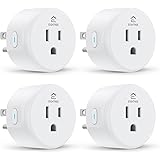
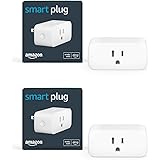
Have you ever rushed out the door, only to be hit with that sinking feeling: “Did I turn off the fan?” Or perhaps the lights, or the TV? It’s a common scenario, one that often leads to a frantic return trip or lingering worry throughout your day. As the helpful video above demonstrates, this everyday dilemma now has a remarkably simple and effective solution: the smart plug.
Instead of manually checking every appliance, imagine controlling your home’s electronics right from your smartphone, no matter where you are. This isn’t science fiction; it’s the practical reality offered by these small yet powerful gadgets. They’re transforming ordinary devices into smart, responsive parts of your connected home.
What Exactly is a Smart Plug?
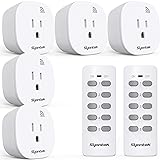
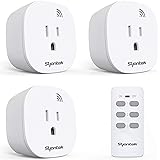
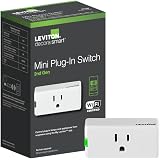
A smart plug is essentially an adapter that fits between your wall outlet and an appliance’s power cord. It transforms any standard electrical outlet into a “smart” one. This means you gain the ability to control the power supply to the connected device remotely, often through a smartphone app, voice commands, or automated schedules.
The device shown in the video, a 10 Amp smart plug, is an excellent example. The ’10 Amperes’ rating signifies its capacity to handle most common household appliances, like lamps, fans, chargers, small kitchen appliances, and even some TVs. However, it’s generally not suited for high-power devices such as heaters, ovens, or washing machines, which typically require a higher amperage rating (often 16A).
Key Smart Plug Features That Make Life Easier
While the video highlighted several benefits, let’s delve deeper into how these features genuinely enhance convenience and efficiency in your daily routine:
- Universal Socket Design: The smart plug featured in the video comes with a universal socket. This practical design ensures compatibility with a wide array of plugs, meaning you won’t struggle with different plug types from various appliances.
- Remote Control from Anywhere: Forget scrambling to check if you left a device on. With a smart plug, you can toggle power to connected devices directly from your phone. You could be at work, on vacation, or simply in another room. This immediate control offers unparalleled peace of mind.
- Customizable Scheduling: This feature is a game-changer. Beyond simple on/off, you can program your appliances to operate on a schedule. Imagine your bedside lamp turning on gently before your alarm, or your coffee maker starting to brew just as you wake up. For security, you can schedule lights to turn on and off periodically when you’re away, making your home appear occupied.
- Energy Consumption Monitoring: The smart plug does more than just switch power. It can also track how much electricity the connected device is using. This valuable data helps you identify energy vampires – appliances that consume power even when not actively in use. Armed with this information, you can make informed decisions to reduce your electricity bill and contribute to energy conservation.
- Compact and Discreet Design: As noted in the video, many smart plugs are quite small. This means they don’t block adjacent outlets, maintaining the aesthetic of your home without adding bulky gadgets.
Setting Up Your Smart Plug: A Beginner’s Guide
The setup process for a smart plug is surprisingly straightforward, designed even for those new to smart home technology. The video provides a quick overview, but here’s a more detailed breakdown:
- Plug It In: Simply insert the smart plug into any standard wall outlet.
- Activate Pairing Mode: Typically, you’ll press and hold a power button on the side of the smart plug for a few seconds. This puts the device into “pairing mode,” indicated by a flashing light.
- Download the App: Head to your smartphone’s app store (Google Play Store or Apple App Store) and download the accompanying smart home app for your specific smart plug.
- Connect to Wi-Fi: Open the app and follow the on-screen instructions to “Add Device.” The app will guide you through connecting the smart plug to your home’s Wi-Fi network. Make sure your phone is connected to the 2.4GHz band of your Wi-Fi, as most smart plugs primarily use this frequency for stability.
- Personalize and Control: Once connected, you’ll see an interface within the app where you can name your device (e.g., “Living Room Lamp,” “Bedroom Fan”) and start controlling it. This is where you can instantly turn it on/off, set schedules, and monitor power usage.
It truly is that simple! After these few steps, your ordinary appliance becomes a smart, controllable part of your home.
Real-World Applications for Smart Plugs in Your Home
Beyond the common forgetfulness, smart plugs unlock a myriad of possibilities for a more convenient and efficient lifestyle:
- Enhanced Home Security: When you’re away, use smart plugs to randomly turn lights on and off. This simulates occupancy, deterring potential intruders far more effectively than leaving a single light on constantly.
- Automated Morning Routines: Connect your coffee maker or electric kettle to a smart plug. Schedule it to start brewing five minutes before your alarm, ensuring a fresh cup is ready as you begin your day.
- Simplified Appliance Management: Have chargers that constantly draw power, even when devices aren’t connected? Plug them into a smart plug and schedule them to turn off overnight or when you’re out.
- Controlling Seasonal Decorations: Imagine holiday lights that automatically turn on at dusk and off at midnight, without you ever having to brave the cold or crawl behind furniture.
- Child Safety: Use smart plugs to control gaming consoles or TVs, setting specific “off” times to encourage healthier habits. This gives parents an easy way to manage screen time.
- “Always On” Devices: For routers or modems that sometimes freeze, a smart plug allows for a quick, remote reboot, saving you the hassle of physically unplugging and replugging them.
Indeed, the versatility of a smart plug extends far beyond simply switching things on and off. It empowers you to integrate convenience, security, and energy efficiency seamlessly into your home environment, truly making life easier and smarter.
Making Life Easier: Your Smart Plug Questions Answered
What is a smart plug?
A smart plug is an adapter that fits into your wall outlet, making any plugged-in device ‘smart.’ This allows you to control the device’s power remotely using a smartphone app or voice commands.
What are the main things a smart plug can do?
Smart plugs allow you to control devices from anywhere using your phone, set schedules for them to turn on or off automatically, and even monitor how much energy they use.
Is it difficult to set up a smart plug?
No, setting up a smart plug is straightforward. You simply plug it into an outlet, download its app, and follow the app’s instructions to connect it to your home’s Wi-Fi.
What kinds of devices can I use with a smart plug?
You can use smart plugs with common household items like lamps, fans, chargers, and small kitchen appliances. It’s best to avoid high-power devices such as heaters or washing machines.